Having a chat with your car computer - OBDII and Torque
Mike Harding said
12:58 PM Mar 10, 2017
To my surprise there doesn't seem to be a thread mentioning Torque - the vehicle monitoring software, so let's do one.
Virtually all cars made or imported into Australia since the mid 1990s have the facility to connect to a computer programme and upload data regarding their past and present performance. A standard data protocol was introduced for this purpose and is used by all manufacturers, it is called On-board Diagnostics 2 (OBDII - pronounced "Oh Be Dee Two").
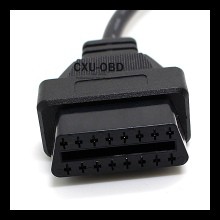
Most (all?) cars (post 199?) will have an OBDII connector *somewhere*? Often it is in the drivers footwell above the pedals - it looks like this:
OK, you've found the OBDII connector now you need something to connect to it - try one of these:
Next you need some software and an Android or Apple phone or tablet. Sadly a bloke in the UK named Ian Hawkins thought of writing this software before I did (the swine!) and did a very good job of it too.
He offers a free version: https://play.google.com/store/apps/details?id=org.prowl.torquefree Or a paid version: https://play.google.com/store/apps/details?id=org.prowl.torque&hl=en
You Apple people can sort it out for yourselves :) Search for "Torque" in the Apple store.
That's it!
Download the software, plug in the Bluetooth OBDII module and see all the wonderful things your car is, or perhaps isn't but should be, doing.
Torque can read and/or clear error codes and has software add-ons which can tell you what the code E2739 actually *means* for your particular vehicle.
Many people have Torque running all the time and find it useful, I only connect it when I want to know something but it's very useful in that if I do have a breakdown in the middle of nowhere I can at least radio or telephone in the error code to give a mechanic a starting point.
Thinking about it; this information would be very useful for people who are not mechanically skilled to pass on rather than their usual error report of; "It won't go" :)
One reason I don't keep the OBDII module connected permanently is that, on my vehicle, even with the ignition off it does draw a small amount of current, 43mA, or about 1Ah per day. That's not a lot but it will mount up if you are camped in one place for a week or more. But when I do that I run the engine every three or so days anyway so I'm probably just being over cautious.
Hi mike.
Is it possible to read live values like egt, coolant temp whilst driving similar to the scan gauge people refer to?
I know its illegal to use your phone but thought it a good example to give us an idea of its capabilities.
Or am i missing the point entirely and its a fault code reader only.
Cheers
Kezngaz.
Mike Harding said
01:35 PM Mar 10, 2017
kezngaz wrote:
Is it possible to read live values like egt, coolant temp whilst driving similar to the scan gauge people refer to? I know its illegal to use your phone
It certainly is possible to read live and changing information with Torque, in fact it allows you to do all sorts of clever statistical analysis if you are so inclined.
Depending upon the vehicle Torque allows you to set up virtual gauges for parameters which are not available via the instrument cluster - it really is quite clever.
From what I know of the Scangauge (which isn't much) I suspect Torque is far superior... and much cheaper.
In Victoria at least, it's not illegal to use your phone for this and GPS type uses provide it's mounted in a commercial holder.
Tony Bev said
01:47 PM Mar 10, 2017
Hello Mike
Can you tell me if there is one for a 2002 to 2005 Australian version of the Fiat Ducato 2.8 JTD engine, and if so, can I have a link to it please
The engine was changed to a 3 litre in late 2006 which is completely different to my model, which was made about September 2006
I had spent many hours looking and can not buy one even from the Fiat people
Thanks
Mike Harding said
03:08 PM Mar 10, 2017
Hi Tony
I'm afraid I have no knowledge of specific vehicles outside my own.
However, as OBDII is a mandated requirement for all vehicles sold in the USA, and has been for many years, I am pretty sure Fiat will support it. Given the Bluetooth dongle is only $15 and there is a free version of Torque it would be worth buying a dongle for test purposes.
Ask Fiat if your vehicle supports OBDII.
MH
macka17 said
03:39 PM Mar 10, 2017
Torque is ok. But the $200 Scanguage does a lot more.
I started off with freebie. than the $20? paid one.
than migrated to Scanguage.
It's on a different planet. Try it first..
Yuglamron said
04:10 PM Mar 10, 2017
Just as an add on to this post. You can now buy a Heads Up Display that plugs into your OBD11 Port in the car which can display speed, Fuel consumption gear, and other data on your windscreen. Fleabay or Aliexpress both have them.
This is a link to Aliexpress who have lots of them for sale this is just one such device.
-- Edited by Yuglamron on Friday 10th of March 2017 04:14:47 PM
Tony Bev said
05:18 PM Mar 10, 2017
Thanks for the info Mike, it is appreciated
I have yet to come across a person who has a 2006 Ducato, who has used a OBD11 successfully
They say that F.I.A.T stands for Fix It Again Tony, with Tony representing the Fiat garage
I have to keep a laptop with a copy of XP, as the downloaded 2006 Fiat Ducato workshop type manual, does not work on newer versions of Windows
Fiat in West Australia, do not sell an official workshop manual, or a OBD11 for this model vehicle
Mike Harding said
05:40 PM Mar 10, 2017
Hi Tony, sorry I couldn't be of more help :(
It appears Fiat did not sell the Ducato into the USA until 2013:
https://en.wikipedia.org/wiki/Fiat_Ducato
So it is quite possible that earlier models did not use OBDII but instead Fiat's own protocol.
Regarding the workshop manual and XP; have you considered running Virtual Box or one of the other virtual machines?
https://www.virtualbox.org/
This would obviate the need to carry a second notebook.
Tony Bev said
07:19 PM Mar 10, 2017
I will try that, so thanks for that tip Mike, it is appreciated
erad said
08:38 PM Mar 10, 2017
I have a Scangauge2 unit in my Pajero. I leave it connected all the time. It can monitor a whole range of things but I use it to monitor the turbo boost, voltage, cooling water temperature and inlet air temperature (after the intercooler). If I had an automatic transmission, I would use it to monitor the transmission temperature instead of the inlet air temp. I would love it to be able to monitor Exhaust Gas Temperature, but my Pajero (and most vehicles) doesn't have an EGT sensor, so it is a bit hard to monitor it. Scangauge monitors a range of parameters, all to do with the car's ECU calculating the optimum amount and timing of each fuel injector pulse.
Scangauge is very good, but I think I prefer Ultragauge. They can monitor up to 8 parameters, they have a slightly larger screen and they also have alarm settings. Ultragauge is (I think) only available from the USA, whereas you can buy scangauge through an Australian agent. That is the main reason I bought the scangauge, but after seeing both, I prefer the Ultragauge. Also, I believe it is cheaper than Scangauge, but not much.
Incidentally, I find the Scangauge illumination at night a bit annoying. I actually turn it off at night because of its location - just below my line of sight. It is a distraction which I don't need at nighttime when things like knagaroos and emus are more important than knowing the level of boost in the turbo.
I think you can also use scan gauge to " reset a fault code" . My Bt50 went into lock down in 2nd gear after a jump start and also would not select reverse. Lucky dealer was only 5km away, all he did was plug in laptop and reset. Bit lucky no damage to control module after jumping, which was via NRMA, but ****ty battery terminal leaves little room for good connection, so no blame to them. Thanks Mike, you made some great posts. Craig
freespirit2 said
11:36 PM Jun 29, 2018
Tony Bev wrote:
Thanks for the info Mike, it is appreciated
I have yet to come across a person who has a 2006 Ducato, who has used a OBD11 successfully
They say that F.I.A.T stands for Fix It Again Tony, with Tony representing the Fiat garage
I have to keep a laptop with a copy of XP, as the downloaded 2006 Fiat Ducato workshop type manual, does not work on newer versions of Windows
Fiat in West Australia, do not sell an official workshop manual, or a OBD11 for this model vehicle
Hi Tony Bev
If your talking about the eLearn workshop manual for the X244 or the X250 version for that matter, It will work on all versions of windows including Windows 10. I have never had any trouble installing it on XP, Win 7, Win 8.1 or as I said Win 10 the only one I haven't tried it on is Vista because I don't have a system with Vista installed. The new laptop I am using now has Win 10 installed & I installed the eLearn with no trouble. Have you tried installing it on a system with Win 10 or are you using the older DTE version workshop manual the one with the red Ducato on the start page?
John, I apologise that I have only just spotted your post
Thanks for that link, I have had a look It appears to be good for other models of Fiat Ducato vehicles Unfortunately it does not cover my 2.8 JTD engine on the 244 chassis This does appear to be strange, as it covers the smaller engine on the same chassis, plus the larger engine on the 250 chassis
Tony Bev said
04:53 PM Jul 1, 2018
freespirit2 wrote:
Tony Bev wrote:
Thanks for the info Mike, it is appreciated
I have yet to come across a person who has a 2006 Ducato, who has used a OBD11 successfully
They say that F.I.A.T stands for Fix It Again Tony, with Tony representing the Fiat garage
I have to keep a laptop with a copy of XP, as the downloaded 2006 Fiat Ducato workshop type manual, does not work on newer versions of Windows
Fiat in West Australia, do not sell an official workshop manual, or a OBD11 for this model vehicle
Hi Tony Bev
If your talking about the eLearn workshop manual for the X244 or the X250 version for that matter, It will work on all versions of windows including Windows 10. I have never had any trouble installing it on XP, Win 7, Win 8.1 or as I said Win 10 the only one I haven't tried it on is Vista because I don't have a system with Vista installed. The new laptop I am using now has Win 10 installed & I installed the eLearn with no trouble. Have you tried installing it on a system with Win 10 or are you using the older DTE version workshop manual the one with the red Ducato on the start page?
Hi, freespirit2
Firstly welcome to the forum
Reading your post and having a think, I have managed to overcome the problem
It is the eLearn manual for the 244 chassis, with the blue coloured Fiat, when you open the manual
I originally downloaded it on a WinXP, and when the free Win10 appeared, I was trying to use the original CD Following the advice from Mike Harding, I was able to run it in Virtual Box After reading your post, I have downloaded it again, on Win10
I am now using Win10, and it seems to open OK, so thanks to both you, and Mike Harding
To my surprise there doesn't seem to be a thread mentioning Torque -
the vehicle monitoring software, so let's do one.
Virtually all cars made or imported into Australia since the mid
1990s have the facility to connect to a computer programme and upload
data regarding their past and present performance. A standard data
protocol was introduced for this purpose and is used by all
manufacturers, it is called On-board Diagnostics 2 (OBDII -
pronounced "Oh Be Dee Two").
Most (all?) cars (post 199?) will have an OBDII connector
*somewhere*? Often it is in the drivers footwell above the pedals -
it looks like this:
OK, you've found the OBDII connector now you need something to
connect to it - try one of these:
http://www.ebay.com.au/itm/OBD2-OBDII-Bluetooth-Car-Diagnostic-Scan-Interface-Scanner-ELM327-B-for-Android-/311049497848?hash=item486bfeacf8:g:7gQAAOxyhS9TfU4B
There are plenty of sellers on E-bay.
Next you need some software and an Android or Apple phone or tablet.
Sadly a bloke in the UK named Ian Hawkins thought of writing this
software before I did (the swine!) and did a very good job of it too.
He offers a free version:
https://play.google.com/store/apps/details?id=org.prowl.torquefree
Or a paid version:
https://play.google.com/store/apps/details?id=org.prowl.torque&hl=en
You Apple people can sort it out for yourselves :) Search for
"Torque" in the Apple store.
That's it!
Download the software, plug in the Bluetooth OBDII module and see all
the wonderful things your car is, or perhaps isn't but should be,
doing.
Torque can read and/or clear error codes and has software add-ons
which can tell you what the code E2739 actually *means* for your
particular vehicle.
Many people have Torque running all the time and find it useful, I
only connect it when I want to know something but it's very useful in
that if I do have a breakdown in the middle of nowhere I can at least
radio or telephone in the error code to give a mechanic a starting
point.
Thinking about it; this information would be very useful for people
who are not mechanically skilled to pass on rather than their usual
error report of; "It won't go" :)
One reason I don't keep the OBDII module connected permanently is
that, on my vehicle, even with the ignition off it does draw a small
amount of current, 43mA, or about 1Ah per day. That's not a lot but
it will mount up if you are camped in one place for a week or more.
But when I do that I run the engine every three or so days anyway so
I'm probably just being over cautious.
Is it possible to read live values like egt, coolant temp whilst driving similar to the scan gauge people refer to?
I know its illegal to use your phone but thought it a good example to give us an idea of its capabilities.
Or am i missing the point entirely and its a fault code reader only.
Cheers
Kezngaz.
It certainly is possible to read live and changing information with Torque, in fact it allows you to do all sorts of clever statistical analysis if you are so inclined.
Depending upon the vehicle Torque allows you to set up virtual gauges for parameters which are not available via the instrument cluster - it really is quite clever.
From what I know of the Scangauge (which isn't much) I suspect Torque is far superior... and much cheaper.
In Victoria at least, it's not illegal to use your phone for this and GPS type uses provide it's mounted in a commercial holder.
Can you tell me if there is one for a 2002 to 2005 Australian version of the Fiat Ducato 2.8 JTD engine, and if so, can I have a link to it please
The engine was changed to a 3 litre in late 2006 which is completely different to my model, which was made about September 2006
I had spent many hours looking and can not buy one even from the Fiat people
Thanks
Hi Tony
I'm afraid I have no knowledge of specific vehicles outside my own.
However, as OBDII is a mandated requirement for all vehicles sold in the USA, and has been for many years, I am pretty sure Fiat will support it. Given the Bluetooth dongle is only $15 and there is a free version of Torque it would be worth buying a dongle for test purposes.
Ask Fiat if your vehicle supports OBDII.
MH
I started off with freebie. than the $20? paid one.
than migrated to Scanguage.
It's on a different planet. Try it first..
Just as an add on to this post. You can now buy a Heads Up Display that plugs into your OBD11 Port in the car which can display speed, Fuel consumption gear, and other data on your windscreen. Fleabay or Aliexpress both have them.
This is a link to Aliexpress who have lots of them for sale this is just one such device.
https://www.aliexpress.com/item/Universal-A8-5-5-inch-Car-HUD-Head-Up-Display-OBD-II-2-Speed-Warning-System/32677525240.html?spm=2114.01010208.3.184.Wz7d5a&ws_ab_test=searchweb0_0,searchweb201602_1_10065_10130_10068_433_10136_10137_10138_10060_10131_10132_10062_10133_10056_10055_10054_302_10059_10099_10103_10102_10096_10052_10053_10050_10107_10051_10106_10084_10083_10080_10082_10081_10110_10111_10112_10113_10114_10078_10079_10073_10070_10122_10123_10126_10124,searchweb201603_1,afswitch_1,ppcSwitch_5,single_sort_0_default&btsid=fefa78f7-3a80-4977-9bf8-43d6451e967b&algo_expid=56bdc801-1e05-4eb4-b55a-1fec0ef95f0c-21&algo_pvid=56bdc801-1e05-4eb4-b55a-1fec0ef95f0c
-- Edited by Yuglamron on Friday 10th of March 2017 04:14:47 PM
Thanks for the info Mike, it is appreciated
I have yet to come across a person who has a 2006 Ducato, who has used a OBD11 successfully
They say that F.I.A.T stands for Fix It Again Tony, with Tony representing the Fiat garage
I have to keep a laptop with a copy of XP, as the downloaded 2006 Fiat Ducato workshop type manual, does not work on newer versions of Windows
Fiat in West Australia, do not sell an official workshop manual, or a OBD11 for this model vehicle
Hi Tony, sorry I couldn't be of more help :(
It appears Fiat did not sell the Ducato into the USA until 2013:
https://en.wikipedia.org/wiki/Fiat_Ducato
So it is quite possible that earlier models did not use OBDII but instead Fiat's own protocol.
Regarding the workshop manual and XP; have you considered running Virtual Box or one of the other virtual machines?
https://www.virtualbox.org/
This would obviate the need to carry a second notebook.
Scangauge is very good, but I think I prefer Ultragauge. They can monitor up to 8 parameters, they have a slightly larger screen and they also have alarm settings. Ultragauge is (I think) only available from the USA, whereas you can buy scangauge through an Australian agent. That is the main reason I bought the scangauge, but after seeing both, I prefer the Ultragauge. Also, I believe it is cheaper than Scangauge, but not much.
Incidentally, I find the Scangauge illumination at night a bit annoying. I actually turn it off at night because of its location - just below my line of sight. It is a distraction which I don't need at nighttime when things like knagaroos and emus are more important than knowing the level of boost in the turbo.
Gday...
I wonder if this provides any assistance, Tony?
http://www.outilsobdfacile.com/location-plug-connector-obd/Fiat-ducato-2
Cheers - John
Hi Tony Bev
If your talking about the eLearn workshop manual for the X244 or the X250 version for that matter, It will work on all versions of windows including Windows 10. I have never had any trouble installing it on XP, Win 7, Win 8.1 or as I said Win 10 the only one I haven't tried it on is Vista because I don't have a system with Vista installed. The new laptop I am using now has Win 10 installed & I installed the eLearn with no trouble. Have you tried installing it on a system with Win 10 or are you using the older DTE version workshop manual the one with the red Ducato on the start page?
John, I apologise that I have only just spotted your post
Thanks for that link, I have had a look
It appears to be good for other models of Fiat Ducato vehicles
Unfortunately it does not cover my 2.8 JTD engine on the 244 chassis
This does appear to be strange, as it covers the smaller engine on the same chassis, plus the larger engine on the 250 chassis
Hi, freespirit2
Firstly welcome to the forum
Reading your post and having a think, I have managed to overcome the problem
It is the eLearn manual for the 244 chassis, with the blue coloured Fiat, when you open the manual
I originally downloaded it on a WinXP, and when the free Win10 appeared, I was trying to use the original CD
Following the advice from Mike Harding, I was able to run it in Virtual Box
After reading your post, I have downloaded it again, on Win10
I am now using Win10, and it seems to open OK, so thanks to both you, and Mike Harding